Updated on: August 21, 2026
3 min read
Limit credential exposure with fine-grained personal access tokens
Explore tokens that carry only the permissions they need, and nothing more.


Update: Now generally available in GitLab 19.2
Fine-grained personal access tokens are ready for production use, so you can scope each token to exactly the permissions a job needs. This release adds full REST API coverage and expanded GraphQL coverage. To efficiently scope a new token, describe your workflow and GitLab Duo suggests a suitable permission set. Existing PATs keep working unchanged. Read the documentation for more information.
Personal access tokens (PATs) authenticate most of the automation that runs in GitLab. When a token is issued with a broad scope like api or read_api, it extends permissions across many projects and groups. Fine-grained permissions for PATs let you scope a token to exactly the privileges the job requires — read access to one project's code, say, instead of read access across every project the user can reach.
The case for narrowing PAT privileges
A maintainer on 20 projects might carry a single token that can read source, modify pipelines, pull from the container registry, and decrypt CI/CD variables across all those projects. The token is scoped to the user, not a specific task, so if it leaks, it exposes every project the user can touch.
Fine-grained PATs let teams ensure that scope follows the task: A read-only token issued for one project is read-only on that project alone. When exposed, investigation and remediation start and end there. Fine-grained PATs join safeguards like lifetime limits and automatic revocation, which limit how long an attacker can misuse a stolen token.
What’s new
You can define a fine-grained PAT along two dimensions:
- Where it can reach: personal projects only, all projects and groups you’re a member of, or only the projects and groups you select.
- What it can do there: per‑resource permissions across the things developers automate against (Issues, Merge Requests, Pipelines, Repositories, Container Registry, and more), with Create, Read, Update, and Delete assigned independently for each resource.
Instead of one PAT that can do everything you can do, you issue one PAT per job, carrying exactly that job's permission set. A pipeline that pushes container images doesn't get an api-scoped token; it gets a token scoped to the Container Registry on a single project, with Create and Read and nothing else. If that token leaks, the blast radius is one registry on one project, not your entire footprint.
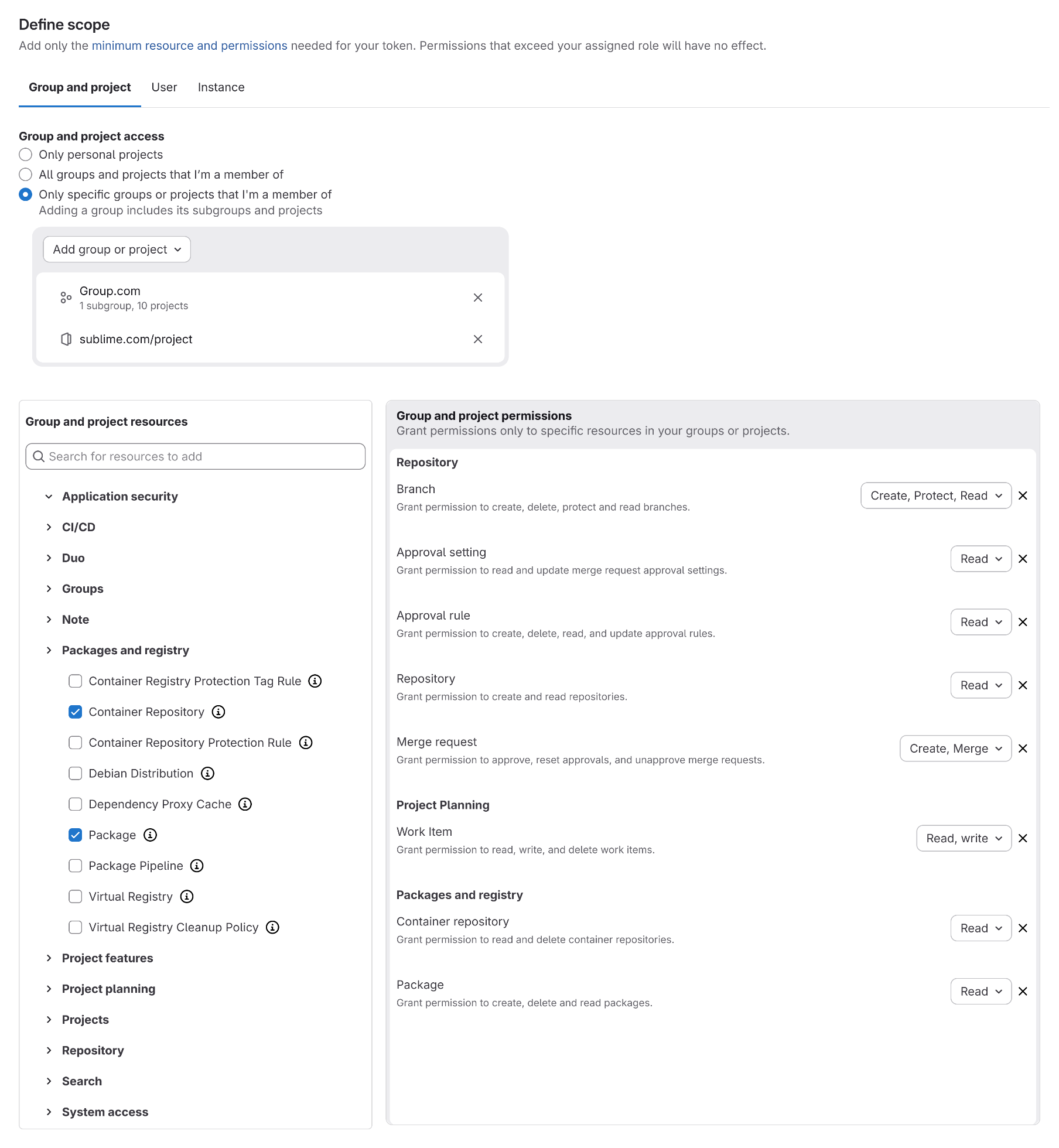 Define a fine-grained PAT's scope by selecting which groups or projects it can reach, then assigning per-resource permissions.
The tokens table has been updated to make this auditable at a glance. Every token you’ve created (coarse or fine-grained) shows the exact scopes and per-resource permissions, so over-privileged tokens are easier to spot during reviews.
Today’s coverage and future roadmap
Fine-grained PATs provide 100% REST API coverage and support an expanding set of GraphQL endpoints.
Existing PATs continue working as before. You can create traditional and fine-grained PATs side by side as you evaluate the new model.
Learn more and share feedback
To create a fine-grained personal access token:
- Navigate to User Settings → Personal Access Tokens.
- Choose Fine-grained token from the Generate token dropdown.
- Define the scope.
To view administrative controls and the full list of supported resources and permissions, check out access the fine-grained personal access tokens documentation.
We’d love to hear how fine-grained permissions for PATs work in your environment, and what else you need to fully adopt least-privilege token patterns. Please share your feedback in this roadmap epic to help shape our next iterations.
More to explore
View all blog posts


We want to hear from you
Enjoyed reading this blog post or have questions or feedback? Share your thoughts by creating a new topic in the GitLab community forum.
Share your feedback